Scene Branching
Branching is a way to create a custom user path through a Scene’s screens. A user’s interactions and responses on the current screen determine which screen appears next. iOS SDK 19.6+Android SDK 19.9+
Use branching in Scenes to create personalized and dynamic experiences tailored to user behavior.
About branching
Branching expands a Scene’s capabilities by ensuring users only see and interact with content according to the rules you create to guide them to specific screens. Design paths between screens using a visual map and conditional logic to create an adaptive experience that is aligned with your desired goals and outcomes.
Branching is essentially a decision tree, and its logic uses conditional if/then/else statements. You define rules where if a user performs one or more actions, then which screen to go to based on the action, and an else alternative if none of those actions were taken. You can add multiple if conditions for each rule and multiple rules per statement.
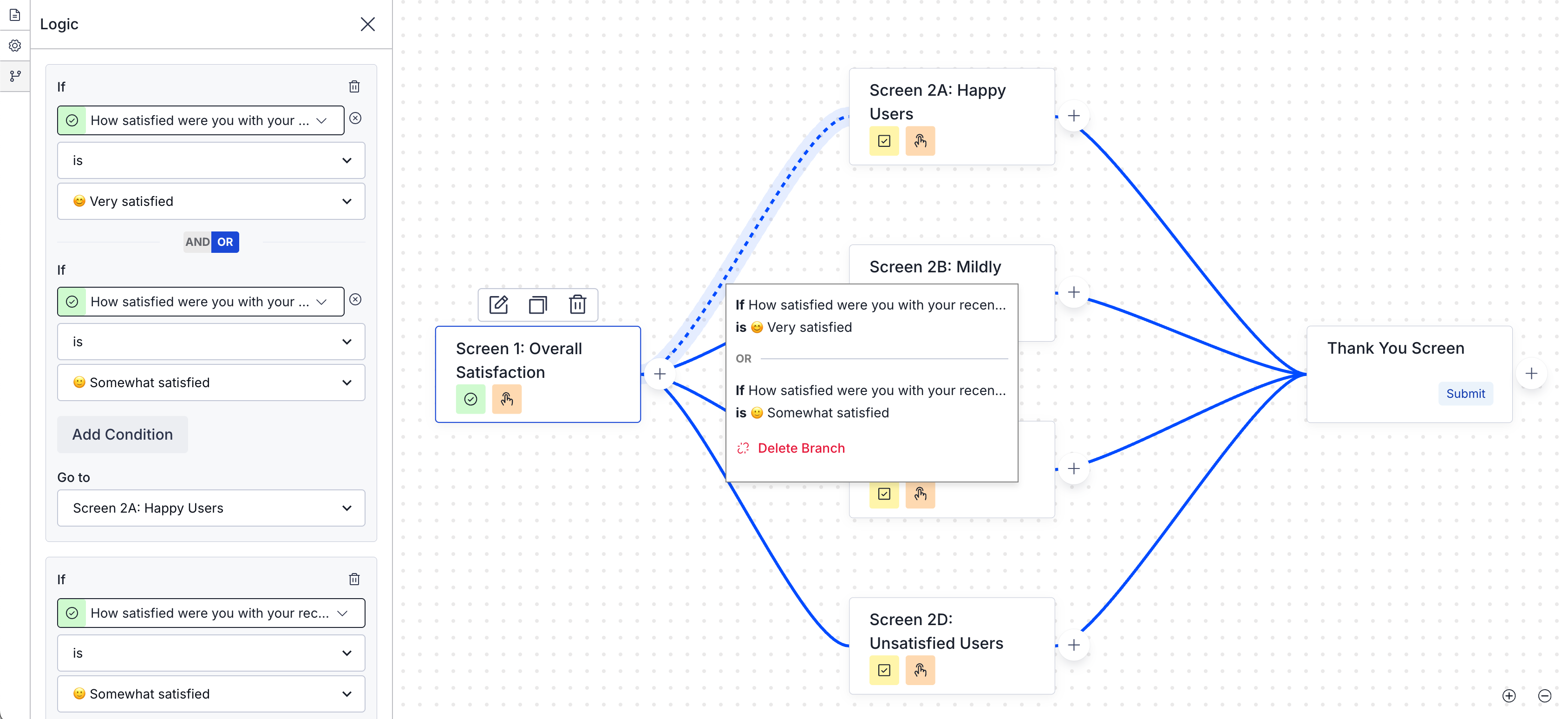
Implementing branching in your Scenes offers several benefits:
- More interactive experiences — Create adaptive flows that change based on user interactions to make your in-app content more customized and engaging.
- Reduced drop-offs — Present specific content to streamline the user experience and decrease abandonment rates.
- Improved data collection — Ask follow-up questions in surveys for more accurate, in-depth data and increased submission rates.
- Better ROI on campaigns — Drive more targeted interactions for more effective campaigns.
You can set up branching for the maximum 20 screens in a Scene. Branching is not available for Stories.
Use cases
Example use cases for various industries:
- Understand what’s driving your NPS — Uncover deeper customer insights on customer loyalty and identify key areas of improvement. Prioritize product, content, or experience enhancements based on real feedback.
- Increase loyalty with a customer-centric loyalty program — Drive adoption, loyalty, and referrals by offering unique incentives and offers based on what your customers want.
- Prevent and convert abandoned carts — Reduce cart abandonment and increase conversions with targeted interventions.
- Fix FAQs before they lead to support tickets — Reduce costs and encourage self-service by enhancing FAQ pages. Measure their effectiveness through real user insights.
- Understand and improve in-store experiences — Find out how your restaurant customers rate their experience and which branches shine the most.
- Increase conversions by optimizing your booking process — Gather customer feedback on preferences, the booking process, and the ease of finding information and payment options.
- Refine your subscription model to drive growth — Uncover customer and prospect satisfaction with your subscription model and its perceived value to guide pricing strategy and retention efforts.
- Increase social media engagement with a data-driven strategy — Grow your number of followers by directing interested users to your social media page. Measure which proposition resonates best to tailor your social media content strategy.
- Provide personalized learning paths — Adapt a learning experience to the user’s level of understanding, ensuring they grasp the material before moving on.
Testing and reports
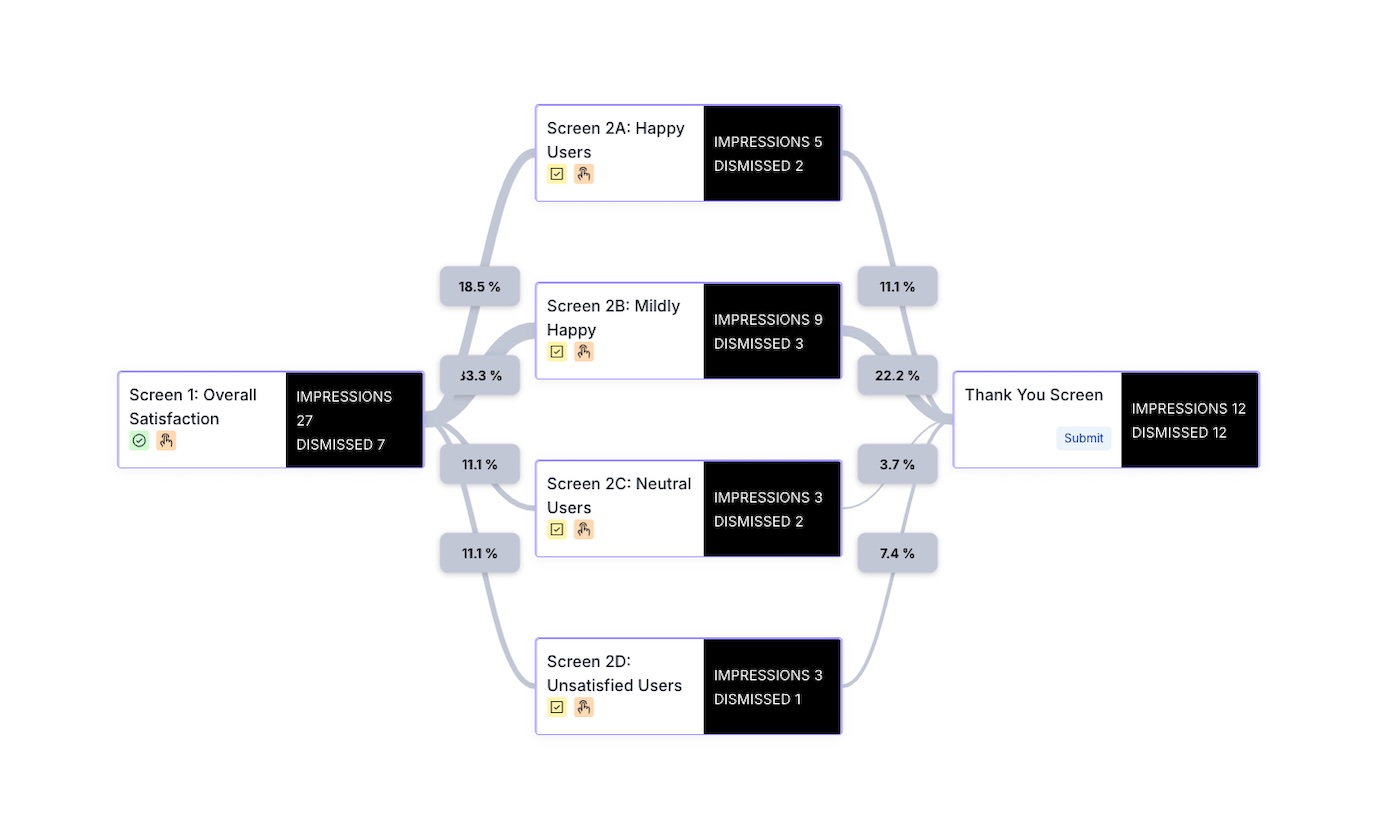
You can test your branching logic as you build, and you can send the Scene to a Test GroupA preview group is audience group used for previewing personalized content in the dashboard. Wherever a personalization preview is available, you can select a preview group, and its group members’ attributes will appear for any Handlebars references to attributes. You can enable any preview group as a test group so you can send test messages to its group members. These messages appear as tests in Messages Overview. to test on actual devices. Message reports for Scenes includes a flow chart that displays a visual representation of the user progression between screens and metrics associated with each screen and branch.
Getting started with Scene branching
See the Scene branching messaging guide to learn how to configure branching and for an example implementation.